Move from Railway to your own cloud in 30 minutes

Step-by-step guide to migrating your Railway web service to your own AWS account. No DevOps hire, no Terraform — full cutover in about 30 minutes.
If you're here, you've already decided to move. Maybe your latest enterprise inquiry asked where your data actually lives. Maybe your Railway bill crossed the line where the CFO started asking questions. Whatever the trigger — this guide gets you from Railway to your own AWS account without handing deployment to a DevOps hire.
This is not a guide to switching to another PaaS. It's a guide to getting out of vendor-controlled infrastructure entirely — your service running in your cloud account, on your compute, with your cloud bill.
If you're still weighing the decision, see how Leanly compares to Railway first.
Why teams make this move
- Predictable costs at scale. Railway's usage-based billing compounds fast once you add services and environments. In your own cloud, you pay AWS directly for compute — no PaaS markup.
- Compliance posture. "Where does your data live?" "On Railway's servers." That answer closes doors with enterprise buyers, healthcare customers, and anyone subject to data-residency requirements. "In our own AWS account, in our own VPC" opens them.
- A shorter dependency chain. Railway runs your workload on their own infrastructure, which sits on top of a third-party cloud. That's two execution layers, two sets of failure modes, two SLAs multiplied together. With Leanly, your app runs directly in your own cloud account. We sit in the orchestration layer only and are never in the path of a live request — so we don't add to your SLA chain. When something does go wrong, you're looking at one console with real logs and alarms, and we're there to help you work through it.
What you'll end up with
After this migration, your app runs in your AWS account. The exact resources depend on what we recommend for your app — Railway services are containerised, so ECS on Fargate is the most common outcome, but we may suggest something better suited to your workload's scaling or cost profile. For ECS, you end up with:
- ECS service — your container, running on Fargate (no cluster to manage)
- Application Load Balancer — public HTTPS endpoint, TLS handled
- ECR repository — your container images
- Security groups and IAM roles — provisioned with sensible defaults; all visible in your AWS console
Whatever we recommend, you own all of it. We provisioned it; you can inspect it, extend it, or hand it to another tool later.
This guide covers stateless web services — Node.js, Python, Go, or similar. If your app connects to a database, bring the connection string as an environment variable. We don't provision databases yet — connect an existing managed database in your AWS account or elsewhere.
Before you start
You'll need a Leanly account with your AWS account and GitHub connected. If you're new to Leanly, sign up here, install the CLI (npm install leanly --global), and connect your accounts — about 5 minutes.
For this guide: your Railway app needs to be in a GitHub repo, and have your environment variables ready to export (step 1 covers this).
The steps
Step 1 — Export your Railway environment variables
Before touching Leanly, get your env vars out of Railway. In the Railway dashboard, go to your service → Variables → Export. Save the output locally.
# Or via Railway CLI:
railway variable list --kv > railway-env-backup.env
Audit the list for Railway-internal references — things like ${{Postgres.DATABASE_URL}} or ${{Redis.REDIS_URL}}. These are Railway-interpolated values that have no meaning outside Railway. Replace them with real connection strings before you continue.
Step 2 — Run leanly init
In your repo:
leanly init
This opens the Leanly UI in your browser.
Step 3 — Watch us analyse your repo
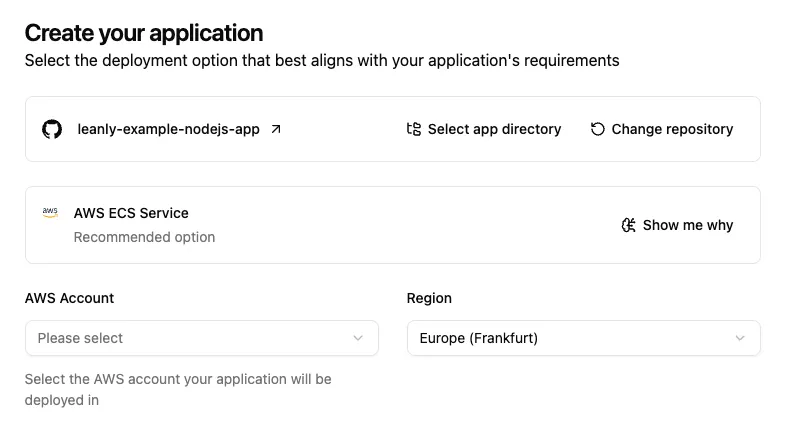
We analyse your repository and determine what it needs to deploy — the right AWS services, sensible defaults, no input from you. Railway apps are containerised, so ECS on Fargate is the most common recommendation — but we may suggest something different depending on your workload's scaling, cost profile, or region requirements. You see exactly what's being created before anything executes.
Step 4 — Select your deployment target
If you have multiple cloud accounts connected, we'll show recommendations across all of them. For this migration, select your AWS account. If we've suggested options across clouds, pick the ECS recommendation to stay on AWS — or choose whichever fits your requirements best.
Step 5 — Add your environment variables and confirm
We show you what we recommend deploying before anything is created. Review the proposal, add the environment variables you exported in step 1, then hit Confirm deployment.
Tip: You can drag and drop a
.envor JSON file directly onto the environment variables section to import them in bulk.
We build and provision everything in your account. You'll have a live endpoint in about 5–8 minutes.
Step 6 — Smoke test the new deployment
Hit the endpoint we give you. Run through your critical paths — auth flows, API responses, anything your app does in production. Keep Railway running in parallel until you're confident.
Step 7 — Cut over DNS
Update your DNS records to point to the new endpoint from the Leanly deploy output.
Allow up to 48 hours for full propagation, though most resolvers update within minutes. Railway and Leanly can run in parallel during this window.
Step 8 — Decommission Railway
Once DNS has propagated and you've verified traffic is routing correctly, delete your Railway services. Railway continues billing until you do.
What's different now
Billing goes from Railway to your AWS account directly. Your compute costs appear in AWS Cost Explorer — no PaaS markup, no Railway invoice. We charge separately for orchestration (see pricing), but the compute bill is yours.
Visibility is real now. Open CloudWatch and you'll see actual logs, metrics, and alarms. Open the AWS console and you'll see the exact resources running. Nothing is hidden behind a vendor dashboard.
Pushing new versions works the same way as before: push to your main branch, we build and deploy automatically via the GitHub integration.
Common gotchas
Railway environment variables that reference Railway-internal services. Catch these in step 1. ${{Postgres.DATABASE_URL}} is a Railway-interpolated variable — it has no meaning outside Railway. Replace it with a real connection string before deploy.
If you're still weighing the move, see how Leanly compares to Railway.